
New Features

Save and Sync Linked Accounts
Vega Discover (Catalog)
June 9, 2026
At participating libraries, patrons who manage linked accounts can now update contact information for managed linked accounts when editing their own account info.
This feature allows guardians to update the email, home phone, mobile phone, and preferred pickup location for managed linked accounts at the same time without having to login to each account individually. Minor and non-managing accounts attached via one-way links will not see this feature.

Improved Partial Author Name Searching
Vega Discover (Catalog)
June 9, 2026
In the Everything and Author searches, if you enter partial author name data for a main author search the catalog will return expected matching results. You can also combine a partial author name with a title in the Everything search.
For example, searching for "Am Ta" returns Amy Tan books!

Automatic Filters
Vega Discover (Catalog)
June 9, 2026
When you add filters to refine your search, the catalog now automatically applies each selection as you make it—no need to click the Apply button each time!
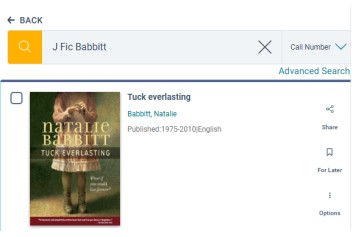
Call Number Browse
Vega Discover (Catalog)
May 12, 2026
Now you can search libraries' collections by call number. Start typing your search parameters and choose the Call Number search option. This can be super helpful as a way to virtually "browse" through our shelves.

Event & Room Booking Wallet Passes
Vega Program (Events & Room Booking)
April 14, 2026
Participating libraries now offer the ability to add event and room booking passes into Apple Wallet and Google Wallet. Your registration confirmation email will have links to both platforms. Once added, you'll see event notifications and updates in places like Maps, Calendar, and more!

See Remaining Renewals
Vega Discover (Catalog)
April 14, 2026
The Account Portal now displays the number of renewals remaining on each of the items you've checked out.

Find Editions Details More Easily
Vega Discover (Catalog)
March 10, 2026
When looking at an individual title, find more information about specific editions of a book or other work by clicking the Details button. It's on the right side of the Edition Table.
- 1Page 1